接收参数的方式
参数格式是 k=v [常见于get请求 或者 文件上传等请求], 直接接收或者 pojo实体接收
/user?id=1&name=bwf&age=88
@GetMapping("/user")
public String getUser(
@RequestParam("id") Long userId, // 必须参数 取出id赋值给变量 userId
@RequestParam(value = "name", required = false) String name, // 可选参数
@RequestParam(value = "age", defaultValue = "18") int age // 默认值
) {
return "user";
}
/user?username=bwf&email=163@qq.com&age=88
@GetMapping("/register")
public String register(UserForm form) {
return "success";
}
@Data
public class UserForm {
private String username;
private String email;
private Integer age;
}
参数格式请求体json格式 [常见于post等请求]
@PostMapping("/order")
public void createOrder(@RequestBody OrderRequest request) {

}

@Data
public class OrderRequest {
    private Long userId;
    private List items;
    private AddressDTO shippingAddress;
    private String paymentMethod;
}
文件上传 MultipartFile类接收
@PostMapping("/upload")
public void upload(User user, @RequestParam("file")MultipartFile[] files, @RequestParam("attach") MultipartFile attach){
log.info("upload---user:{}", user);
}
文件下载
- 图片/excel下载 (前端get/post请求均可)
public void downLoadFile(HttpServletResponse httpServletResponse) {
String filePath = this.getClass().getResource("/static/pic/1.jpg").getPath();
File file = new File(filePath);
String fileName = filePath.substring(filePath.lastIndexOf("/")+1);
try {
InputStream inputStream = Files.newInputStream(file.toPath());
httpServletResponse.setHeader("Content-Disposition", "attachment;filename=" + fileName);
httpServletResponse.setHeader("Content-type","blob");
cn.hutool.core.io.IoUtil.copy(inputStream, httpServletResponse.getOutputStream());
} catch (IOException e) {
e.printStackTrace();
}
}
public void exportExcel(HttpServletResponse httpServletResponse){
List list = "下载的集合"
httpServletResponse.setContentType("application/vnd.ms-excel");
httpServletResponse.setHeader("Content-Disposition", "attachment;filename=" + fileName + ".xlsx");
httpServletResponse.setCharacterEncoding("UTF-8");
com.alibaba.excel.EasyExcel.write(httpServletResponse.getOutputStream, User.class).sheet("sheet1").doWrite(list)
}
@Data
@AllArgsConstructor
public class User{
@ExcelProperty(value={"用户信息","姓名"},index=0)
private String userName;
@ExcelProperty(value={"用户信息","性别"},index=1)
private String sex;
@ExcelIgnore
private String score
}
封装响应统一结果类
import lombok.AllArgsConstructor;
import lombok.Data;

@AllArgsConstructor
@Data
public class Result{
    private String code;
    private String msg;
    private T data;

    public Result(String code, String msg) {
        this.code = code;
        this.msg = msg;
    }

    public static Result ok(){
        return new Result("200", "OK");
    }

    public static Result ok(T data){
        return new Result<>("200", "ok", data);
    }

}
取前端路径参数
@GetMapping("/users/{id}")
public void getUserById(@PathVariable Long id) {
}
@GetMapping("/products/{productId}")
public void getProduct(
@PathVariable("productId") Long id // 参数名与路径变量名不同
) {
}
springmvc 拦截器
-
- 实现
HandlerInterceptor接口生成一个拦截器
-
- 实现
WebMvcConfigurer接口addInterceptors方法添加上述拦截器
@Slf4j
@Component
public class AuthInterceptor implements HandlerInterceptor {
@Override
public boolean preHandle(HttpServletRequest request,
HttpServletResponse response,
Object handler) throws Exception {
log.info("AuthInterceptor.preHandle---start");
return true;
}
@Override
public void postHandle(HttpServletRequest request,
HttpServletResponse response,
Object handler,
ModelAndView modelAndView) throws Exception {
}
@Override
public void afterCompletion(HttpServletRequest request,
HttpServletResponse response,
Object handler,
Exception ex) throws Exception {
}
}
@Configuration
public class MySpringConfig implements WebMvcConfigurer {
@Autowired
private AuthInterceptor authInterceptor;
@Override
public void addInterceptors(InterceptorRegistry registry) {
registry.addInterceptor(authInterceptor).addPathPatterns("/**");
}
}
拦截器执行顺序
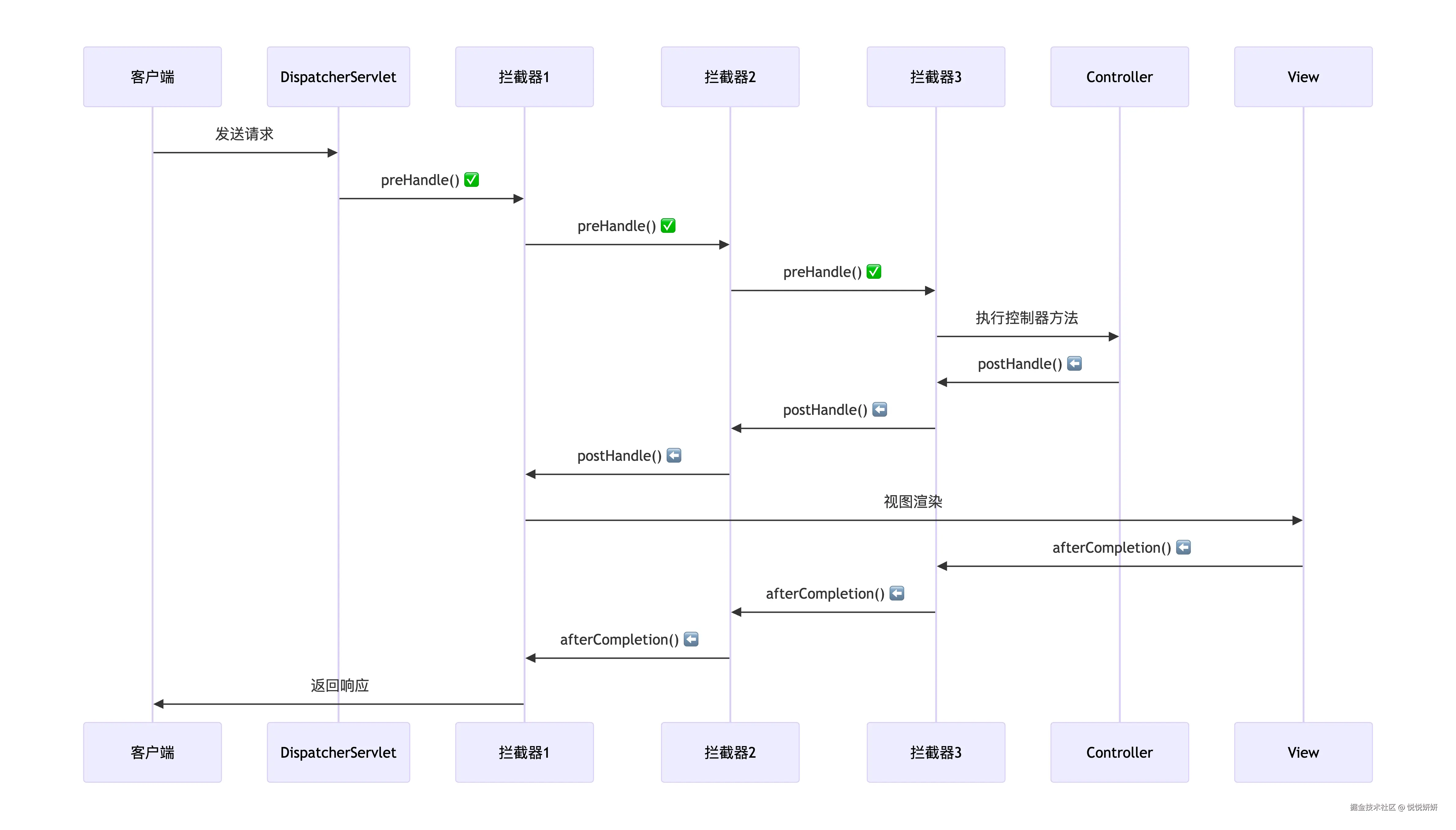
请求进入 →
    拦截器1.preHandle()  (放行)
    拦截器2.preHandle()  (放行)
    拦截器3.preHandle()  (放行)
    ↓
    Controller执行
    ↓
    拦截器3.postHandle() ← (逆序)
    拦截器2.postHandle() ← (逆序)
    拦截器1.postHandle() ← (逆序)
    ↓
    视图渲染
    ↓
    拦截器3.afterCompletion() ← (逆序)
    拦截器2.afterCompletion() ← (逆序)
    拦截器1.afterCompletion() ← (逆序)
    ↓
响应返回
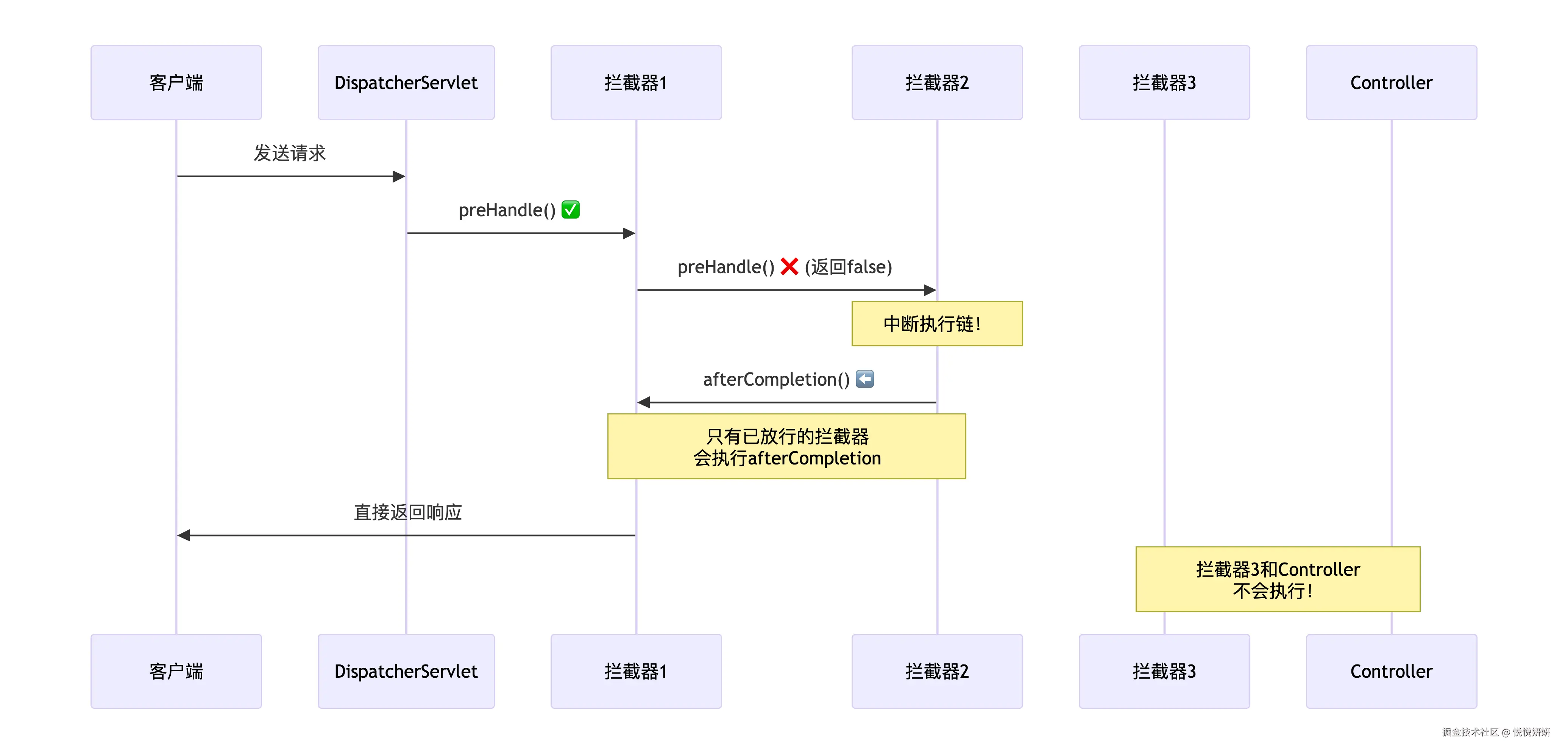
请求进入 →
    拦截器1.preHandle()  (放行)
    拦截器2.preHandle()  (返回false,拦截!)
    ↓
    【中断!】后续拦截器3和Controller不会执行
    ↓
    拦截器1.afterCompletion() ← (只有放行的才执行)
    ↓
    直接返回响应给客户端
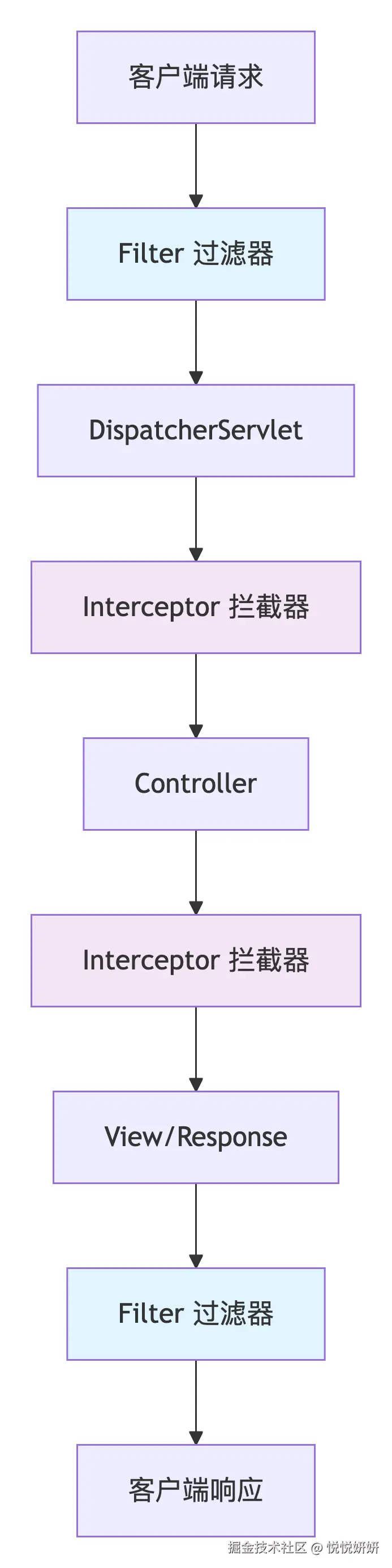
Spring MVC 拦截器 vs 过滤器(Filter)
| 对比维度 | Filter(过滤器) | Interceptor(拦截器) |
|---|
| 所属规范 | Servlet 规范(J2EE) | Spring MVC 框架 |
| 依赖 | 依赖 Servlet 容器(Tomcat) | 依赖 Spring 框架 |
| 位置 | 在 DispatcherServlet 之前 | 在 DispatcherServlet 之后,Controller 前后 |
| 作用范围 | 对所有请求有效 | 只对 Spring MVC 处理的请求有效 |
| 放行 | chain.doFilter() 放行请求 | preHandle返回true 放行请求 |
| 使用场景 | 字符编码、CORS、安全过滤、日志记录 | 权限验证、日志记录、性能监控、数据预处理 |
| 配置方式 | web.xml 或 @WebFilter 注解 | 实现 WebMvcConfigurer 接口 |
| 执行顺序 | 通过 @Order 或 web.xml 配置顺序 | 通过 order() 方法配置顺序 |